Remote Web Desktop Full
No Ads.2.
Secure HTTP enabled, provide 1024 bits RSA encryption.3.
No file upload limits (larger size, high speed and multiple drop&down).4.
Enhanced contact features (group message, add new contact).5.
Full screen Gallery Viewer.
# Features* Desktop SMSMessage management.
Support long SMS, group messages and fake SMS.
Partial support sending MMS.
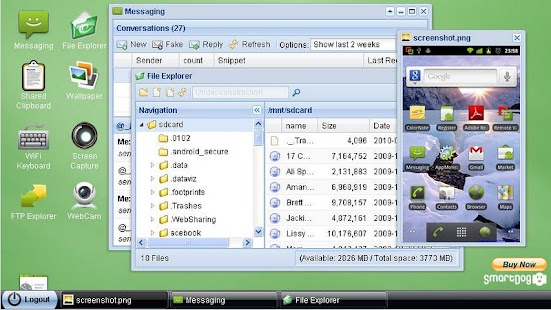
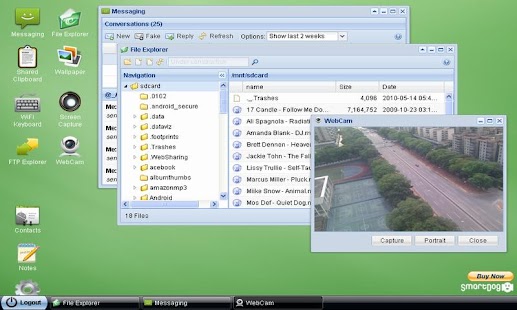
* File ExplorerManage files on SD card, transfer files between phone and computer.
Multiple upload by drag-and-drop.
Gallery Viewer and Text Editor embeded.
* Media PlayerEnable you play video/audio on phone side or web desktop side.
* FTP ServerSync files and folders between phone and computer quickly, manage SD card files in Windows File Explorer, browser or FTP client.
* WiFi KeyboardType on your phone using your computers keyboard.
* WebcamTurns your phone into a wireless camera, view your camera with web browser.
Support both front face and back camera.
* Screen CaptureTake the screen shot and view it in web browser.
* Contact ManagerManage contacts and call log.
* Remote CallMake a call from computer side.
* Shared ClipboardShare clipboard text between PC and phone.
* Wallpaper UtilSet phone wallpaper by upload a picture or online picture.
* APK Web InstallerBackup apps to SD card, and install APK through the File Explorer.
* Personal Web ServerServe your personal web pages on your phone.
* LogCatView android logs in web desktop.
* Terminal EmulatorRemotely access Androids built-in Linux command line shell through web browser.
* NotesCreate a note shortcut on phone screen for text file.
* SSL HTTPProvide 512, 1024 bits RSA encrypt.
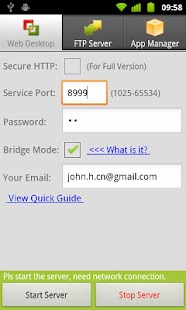
* Network BridgeSupport all internet connections (2G/3G/4G/WiFi), even you dont have a public IP, you still can access your phone at any place.
# Features for Rooted Phone* Remote ControlRemotely control your Android within your computer.
Including mouse & keyboard emulation.
# Online Guidehttp://smartdogstudio.blogspot.com
# About Permissions & SecurityIt requires many permissions just because those features require them, we dont install any spy code in any our apps and dont collect any data from your device.
# Third-part Library LicensesExt GWT: Commercial LicensedApache Projects & Libraries: Apache LicenseJQuery: MIT LicenseGalleria Classic Plug-in: MIT LicenseTerminal Plug-in: LGPL V3
About Remote Web Desktop Full
- Package name (App ID)
- net.xdevelop.rmp
- Available on
- Google Play
- Price
- Free
- Developer
- Splashtop
Looking for the Remote Web Desktop Full APK?
The safest way to get Remote Web Desktop Full (net.xdevelop.rmp) on your Android device is to install it directly from Google Play — you'll always get the latest official version, automatic updates, and no risk of modified or infected APK files from third-party sites.
Music Features
Enjoy high-quality music streaming and playback features.
Social Features
Connect and share with friends and the community.
Gaming Features
Enjoy immersive gaming experience with various game modes.
See Remote Web Desktop Full in Action
Frequently Asked Questions
Is Remote Web Desktop Full free?
Yes, Remote Web Desktop Full is free to download and install on Android through Google Play.
How do I install Remote Web Desktop Full on Android?
Open Google Play on your Android phone or tablet, search for Remote Web Desktop Full by Splashtop or tap the Google Play button on this page, then tap Install. The app downloads and installs automatically.
What is net.xdevelop.rmp?
net.xdevelop.rmp is the App ID (package name) of Remote Web Desktop Full on Google Play. Every Android app has a unique package name, and it is the safest way to verify you are installing the official app.
Is Remote Web Desktop Full safe to download?
Installing Remote Web Desktop Full from Google Play is the safest option: you get the official version published by Splashtop, verified by Google Play Protect, with automatic updates. Avoid APK files from unofficial third-party sites.

Get Remote Web Desktop Full Today
Remote Web Desktop Full for Android — free download on Google Play.
Compatible with Android phones and tablets — available on Google Play.
Ask AI about this app
Get instant answers about features, tips and more from popular AI assistants.